
AXIX IDP
Documents that finish the journey to trusted fields
Upload packets, let AXIX IDP read and classify them, extract structured fields, then confirm everything in a review dashboard built for back-office pace.
Bank statement and generic presets · Ops, reviewers, and admins on one workspace
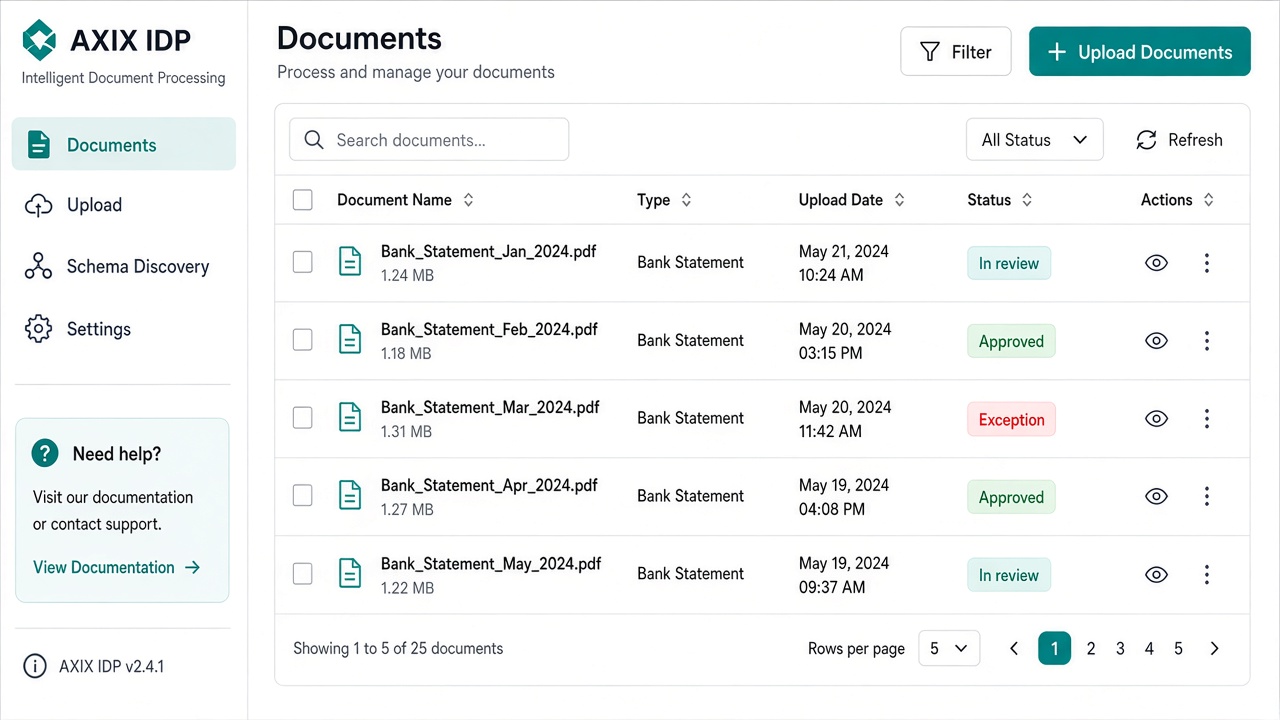
PDFs pile up faster than spreadsheets can keep up
Finance and ops still open statements one by one, chase missing pages, and rebuild the same grids every month. AXIX IDP gives that work a pipeline — intake, reading, classification, extraction, and sign-off — so volume days feel managed instead of heroic.
PIPELINE
WORKSPACE
TEAMS & PRESETS
Work with the packets you already know
Bring bank statements and generic forms into AXIX IDP, choose a preset, and let the pipeline handle reading, classification, and extraction — while review, Schema Discovery, and Document knowledge stay in the same workspace.
Start free trialAXIX IDP — DOCUMENT PIPELINE
How AXIX IDP moves a packet
A single path your whole team can name out loud.
Upload
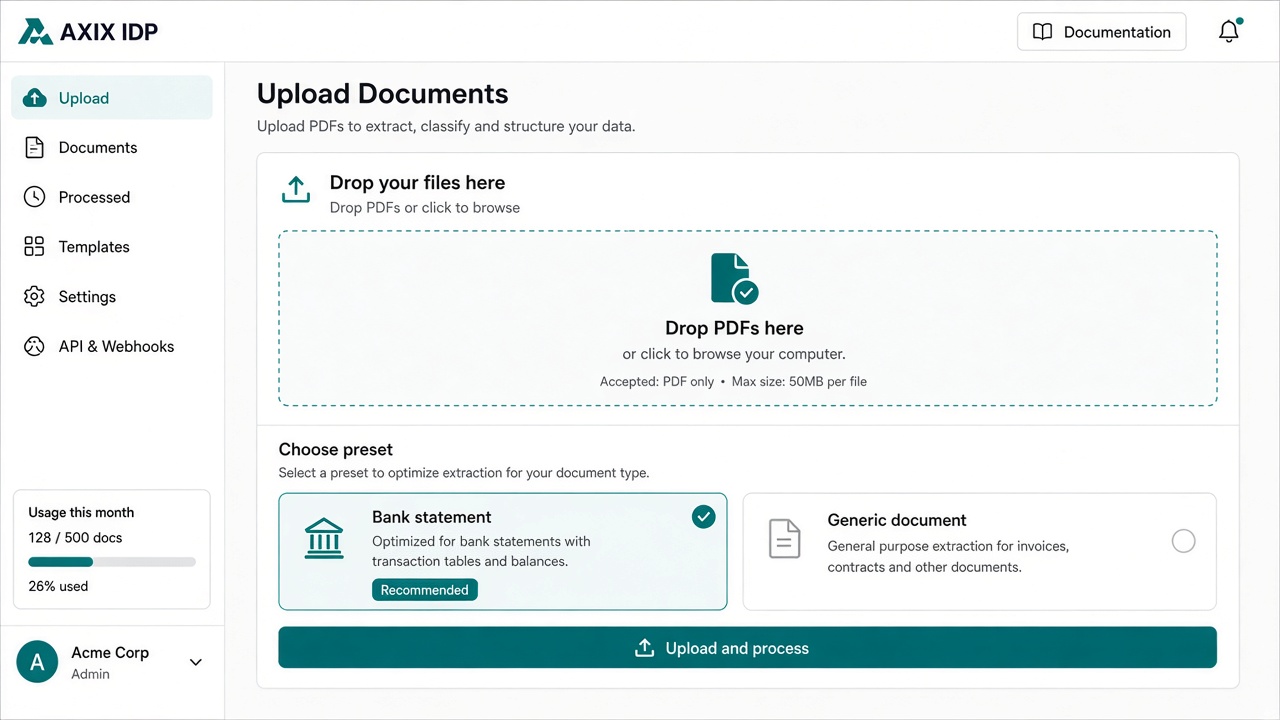
Bring PDFs and scans into AXIX IDP — single files or mixed batches — and choose bank-statement or generic presets.
Read
AXIX IDP reads each page so text and layout become usable for classification and field work.
Classify
Documents are typed and routed so the right schema and review path apply — statements vs. generic forms.
Extract
Fields, tables, and repeating rows are pulled into structured results ready for human confirmation.
Review
The review dashboard surfaces confidence, exceptions, and ownership so ops and analysts can sign off.
Review that respects judgment
Confirm fields where confidence is low — not every line by hand
The review dashboard highlights exceptions and uncertain extractions so analysts spend time where it changes outcomes. Approved results become the record for exports and document Q&A.
- Status from intake through sign-off
- Confidence and exception cues
- Assignee ownership across shifts

Built for the people who touch the packet
Four solution paths — same Intelligent Document Processing underneath.
What teams notice first
Operations
“Upload stops being a ticket — batches enter the pipeline and the queue shows what still needs a human.”
Frequently asked questions
Straight answers about the AXIX IDP workspace, modules, and review path.
AXIX IDP (Intelligent Document Processing) is Axix Technologies’ workspace for moving documents from upload through reading, classification, field extraction, and human review — with modules for Documents, Upload, Schema Discovery, Settings, Document knowledge Q&A, and Agent chat.
From the product overview
AXIX IDP turns unstructured documents into trusted fields
AXIX IDP is Axix Technologies’ Intelligent Document Processing workspace: teams upload PDFs and similar packets, the system reads and classifies them, extracts structured fields (including tables), and reviewers validate results in a web dashboard — with optional page-quota integration against the Axix customer portal. On this page, AXIX IDP stays on that same path so home never becomes an orphan folder.
- Read → classify → extract → review dashboard
- Bank statement and generic presets built in
- Page usage can tie to axixtechnologies.com plan limits
Who AXIX IDP is for
Three roles from the product brief — same workspace, different first clicks.
Operations / back-office
Digitize bank statements, invoices, forms at scale — Upload starts the pipeline; Documents tracks progress.
Analysts / reviewers
Check extracted fields, fix gaps, export results — open status, classification, and field grids in Documents.
Admins
Configure schemas, settings, and access — Schema Discovery for new types; Settings for portal linkage and capacity.
Suggested walkthrough from AXIX IDP
The same first path the product overview recommends — adapted for every marketing route.
Sign in and open the workspace
After login you get AXIX IDP with left navigation: Documents, Upload, Schema Discovery, Settings, plus knowledge and agent chat where enabled.
Upload a document
Send one or more PDFs to start the pipeline. Track progress from the Documents list while reading, classification, and extraction run.
Review in Documents
Open a packet for status, extracted fields, classification, and page artifacts. Reprocess or remove items when needed; export when fields are trusted.
Refine schemas and capacity
Use Schema Discovery when onboarding a new document type. Admins use Settings for portal / account linkage and processing preferences — including page limits against the Axix portal.

What document teams notice on AXIX IDP
Bank-statement presets pull account, holder, period, balances, and transactions. Generic covers title, date, parties, amounts, and key-values until we refine the schema.
See AXIX IDP on your own packets
Start a free trial, walk the upload-to-review path, and decide how bank-statement and generic presets fit your queue.